
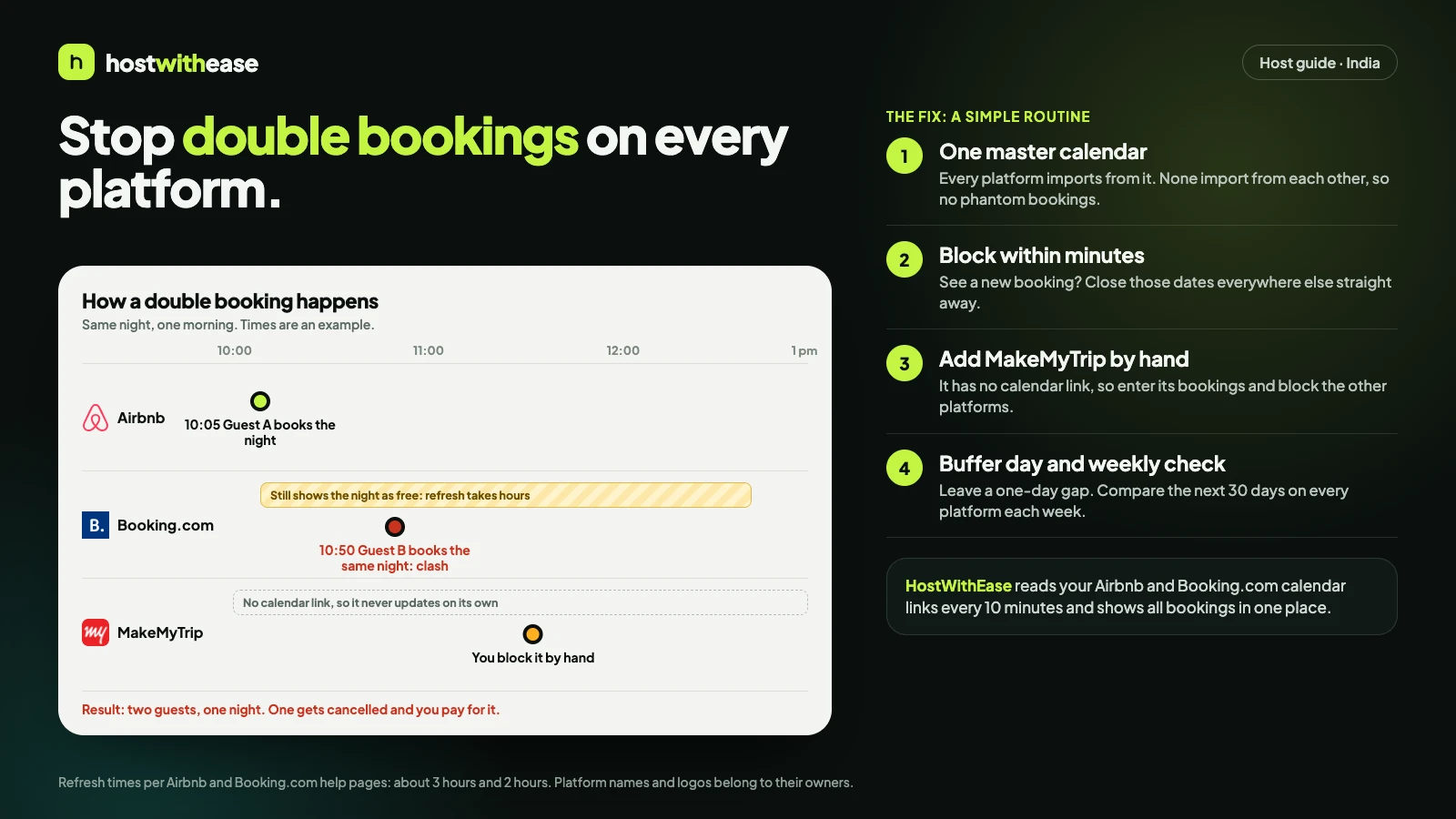
If you host on more than one platform, you have probably felt that sinking moment: a guest books on Airbnb while a different guest books the same dates on Booking.com. One has to be cancelled, you pay in refunds and goodwill, and the guest you cancel may leave a review you did not earn.
It is avoidable. This guide explains how calendars sync between platforms, where that sync has gaps, and a routine that closes them. It is written for hosts in India who list on Airbnb, Booking.com and MakeMyTrip.
Why double bookings happen
When a booking lands on one platform, the others do not know until something tells them. Two things cause the gap:
- Delay. Airbnb says its calendar updates about every 3 hours. Booking.com's calendar sync refreshes about every 2 hours. Two guests can book the same night inside that window.
- No link at all. MakeMyTrip does not offer a calendar link you can use, so it will not update from Airbnb or Booking.com by itself.
How calendar links (iCal) work
Airbnb and Booking.com let you export your calendar as a link ending in .ics. You paste that link into the other platform, and it reads your booked dates.
- In Airbnb, open Calendar, choose your listing, then Availability, and find Connect calendars. Copy the Airbnb calendar link.
- In Booking.com, go to Rates and Availability, then Sync calendars, and add a calendar connection. Paste the Airbnb link as an import, and copy the Booking.com export link into Airbnb.
- Check that the link contains
/ical/or ends in.ics. Other links will not work.
Treat these links like passwords. Anyone who has one can see your booked dates.
The two gaps that still cause trouble
The refresh delay. Even with links set up both ways, a booking made at 10:05 may not appear elsewhere until the next refresh, hours later.
Echoes. If platforms import each other directly, the same booking can bounce around and show up as a phantom second booking. A cleaner setup is one central calendar that every platform imports from.
A routine that closes the gaps
- Keep one master calendar. A tool or a shared sheet, but every booking from every platform goes in it.
- Block fast. The moment you see a new booking, close the same dates elsewhere. Minutes, not end of day.
- Turn on new-booking notifications on every platform and send them to one phone.
- Add MakeMyTrip by hand, and block those dates on Airbnb and Booking.com.
- Leave a buffer. A one-day gap gives your cleaner time and gives you slack if a clash slips through.
- Check weekly. Scan the next 30 days on every platform and compare.
If a double booking happens anyway
- Contact the guest who booked second, apologise plainly and explain what happened.
- Offer a refund and, where you can, help them find a nearby alternative.
- Cancel through the platform's own process so records stay correct, and read its rules on host cancellations first.
- Note the cause and fix that gap, usually a missed block.
Where HostWithEase fits
HostWithEase reads your Airbnb and Booking.com calendar links every 10 minutes and shows every booking on one screen, with the platform logo beside each guest. The Today view lists check-ins and check-outs across your listings and flags a listing with an empty week ahead. MakeMyTrip bookings go in by hand for now.
We never ask for your Airbnb password, and we do not remove the platforms' own refresh delay. We shorten the time between a booking and you knowing about it, which is where most double bookings start. Try it free for 14 days at hostwithease.in.
Frequently asked questions
Does MakeMyTrip sync with Airbnb through a calendar link?
Not today. MakeMyTrip connects through approved channel managers, so you add its bookings by hand and block the dates on other platforms.
How often do Airbnb and Booking.com refresh calendars?
Airbnb says about every 3 hours and Booking.com about every 2 hours, according to their help pages. Check current figures, as they can change.
Is it safe to share my calendar link?
Treat it like a password. It shows your booked dates to anyone who has it, but it does not give access to your account.
Comments
Sign in to comment.
- No comments yet.